Autonima
Autonima is a large language model (LLM)-guided framework for neuroimaging meta-analysis. It automates article screening against expert-defined eligibility criteria, parses heterogeneous coordinate tables into the distinct analyses that produced them, and selects individual analyses for quantitative synthesis.
The distinction that matters is between an article and an analysis. A relevant paper often reports several experimental comparisons, only some of which address a given question — increases and decreases, patients and controls, whole-brain and region-of-interest. Automated synthesis frameworks have generally pooled every coordinate in an included paper. Autonima selects at the level of the individual analysis.
The workflow
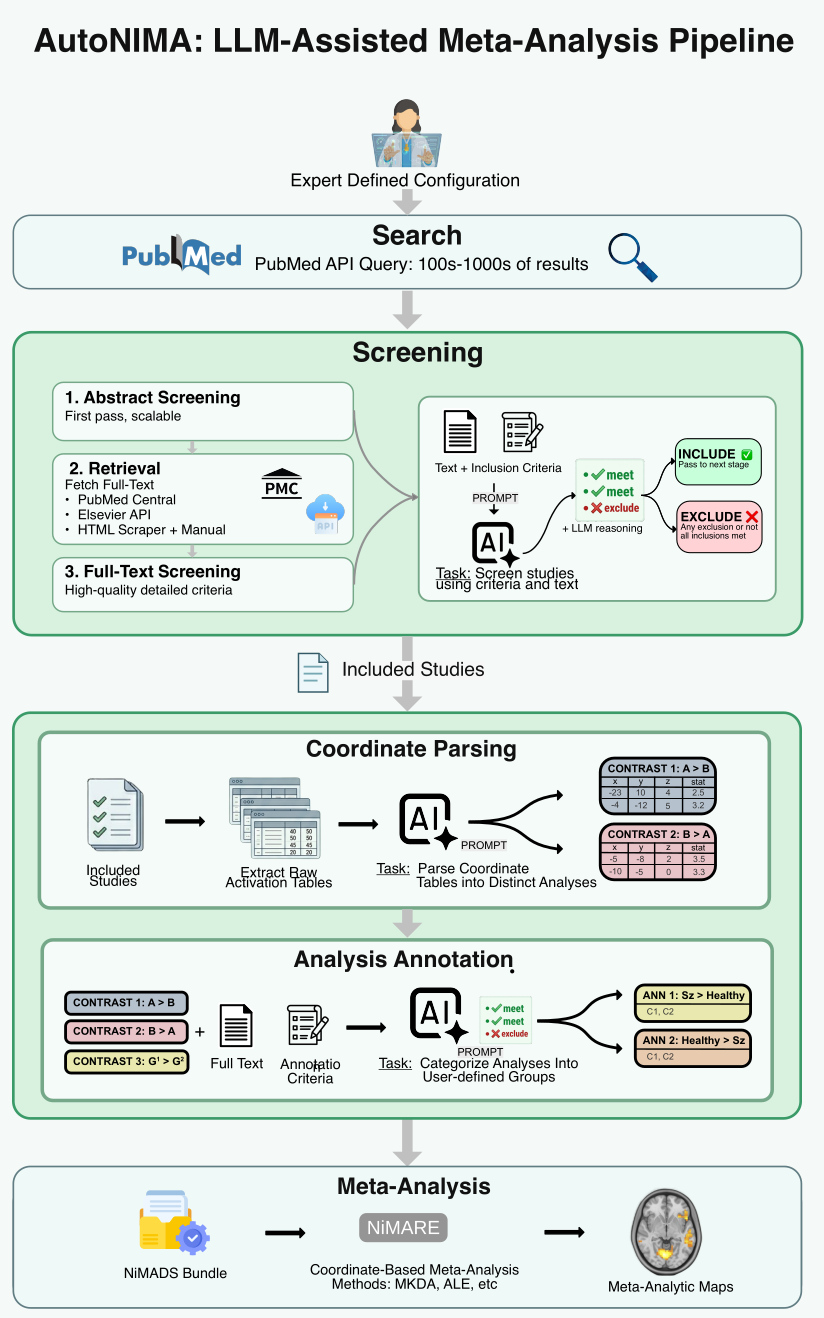
A project is one YAML file: a PubMed query, article-level inclusion and exclusion criteria, retrieval sources, parsing settings, and one set of contrast-specific criteria per target. The pipeline executes these stages in order, caching each so a re-run resumes rather than repeating paid API calls.
| Stage | What happens |
|---|---|
| Search | PubMed through the Entrez API |
| Abstract screening | an LLM judges each record against the article-level criteria, returning a decision, a criterion-by-criterion assessment and its reasoning |
| Full-text retrieval | PubMed Central via pubget, plus local full-text sources such as HTML already downloaded from publisher text-mining APIs |
| Full-text screening | the same procedure against the complete criteria, with the full text in context |
| Coordinate parsing | heuristics find candidate tables; an LLM separates each into the distinct statistical analyses it reports |
| Analysis selection | every analysis is evaluated against each target's criteria, producing an analysis × target inclusion matrix |
| Meta-analysis | selected coordinates become a NiMADS studyset, submitted to NiMARE |
Four stages are LLM-assisted — abstract screening, full-text screening, coordinate parsing and analysis selection. Each uses a task-specific prompt combining general instructions with your configuration, and each returns output validated against a Pydantic schema, so every decision carries a machine-readable verdict alongside its reasoning.
Two design points are worth knowing up front:
- Retrieval failures are not eligibility decisions. An article whose full text cannot be obtained is marked unavailable; one whose text arrived incomplete is flagged as such by the screener. Neither is recorded as a judgement that the article was ineligible.
- One analysis can serve several targets. Each analysis–target pair is evaluated independently, so an analysis satisfying the criteria for two contrasts is assigned to both.
Two ways to run it
Both drive the same pipeline and produce identical outputs.
- The CLI runs one config, once, into one folder. No state between invocations. Use it for scripted, reproducible work.
- The web UI manages many projects over time: live progress, cancellation, project cloning, artifact browsing, credential storage. Use it while developing criteria.
A project created in one can be run from the other.
Who this is for
- Researchers running systematic-review style neuroimaging pipelines
- Users preparing reproducible
config.ymlfiles for search, screening, retrieval, parsing and selection - Maintainers who need a stable reference for the CLI surface and output layout
Start here
- Installation
- Quickstart
- Configuration Guide
- CLI Usage Guide
- Web UI Guide
- Outputs Guide
- Interpreting Outputs
- CLI Reference
Important notes
run,run-search,run-abstract, andvalidateuse positional arguments:autonima <command> CONFIG [OUTPUT_FOLDER].- If you omit
OUTPUT_FOLDER, the CLI defaults to a sibling directory derived from the config file stem. Example:projects/cue_reactivity/default.yamlbecomesprojects/cue_reactivity/default/. - The config file still needs a non-empty
output.directoryfield because configuration validation currently requires it. - Model identifiers and API endpoints are configurable, so any OpenAI-compatible provider can be used.